
Security firm RedAccess went looking for apps built with AI coding tools and published on those tools' own hosting, and it found more than 5,000 with virtually no security or authentication of any kind. Among the screenshots it shared with Wired was what appeared to be a hospital's work assignments, complete with doctors' personal information.
Building is the part AI coding tools made easy. The exposure in AI-built apps for HR teams comes later, when a leave tracker or interview scorecard goes live the way it was demoed: a public link, one admin login, and the whole employee table behind it.
TL;DR
- A tool that helps decide who gets hired or promoted, or how people are rated, may count as high-risk under the EU AI Act. It goes to IT and to legal or the DPO before it scores anyone.
- Employee records never sit on the AI coding tool's own hosting. The default is a server the team controls, reachable only on a private network, with company sign-in in front once managers or all employees need access.
- The fixes go through the same AI tool that built the app: trim the fields it reads, give HR admins, managers and employees different views, move credentials out of the code, cut back what it sends outside, log who opens which record, and handle deletion requests around retention requirements. A check you run yourself confirms each one; the AI's own report doesn't.
- Access to the tool should end the day employment ends, one named person should own it, and choosing a server location doesn't make anything compliant.
The Deployment Mistakes That Expose Employee Data
An AI-built HR tool exposes employee data to anyone who finds its link, anyone holding a credential pasted into a chat or the code, colleagues opening records meant for someone else, outside services it sends data to, and people who have left, with no record of who looked. Reading the whole employee table widens every route.
| Mistake | What it exposes | Fix | Where it's fixed |
|---|---|---|---|
| Publishing on the AI tool's own hosting with a public link | A leave tracker's accommodation and medical-leave notes, readable by anyone with the URL | Move it to a server the team controls, on a private network | Where it runs |
| Pasting a database password or HRIS or payroll API token into the chat or the code | Anyone with the chat history or repository can reach the HR system, SSNs and national IDs included | Replace the credential and keep it out of the code | Credentials |
| Reading the whole employee table when the tool needed three columns | SSNs, salary, and immigration and work-authorization status sitting inside a tool built to show leave balances | A database login that reaches only the fields the tool needs | Fields |
| Everyone who signs in sees every record | Managers see their peers' salaries; performance review scores are visible across the company | Three roles, checked on the server | Roles |
| Candidate data sent to outside services | Candidate pipeline PII (CVs, interview notes) copied to an AI API or an analytics script | Audit what leaves the tool and cut it back | Outbound data |
| Access that outlives employment | A leaver's account, or the builder's own admin login, still opens everyone's records | Company sign-in plus session revocation, so offboarding closes it | Offboarding |
| No record of who opened or deleted what | Nobody can tell who viewed an accommodation file, and a deletion request can't be answered safely | An append-only audit log and a deletion tool that respects retention requirements | Audit log and deletion |
The first row is the one RedAccess found at scale. In Wired's report on RedAccess's findings, three of the four AI coding companies pushed back on the researchers' claims (the fourth didn't respond), but they didn't deny that the vibe-coded apps RedAccess found were left exposed. I read that as a configuration problem and a skipped review step.
Check Whether the Tool Helps Decide Who Gets Hired, Promoted or Rated
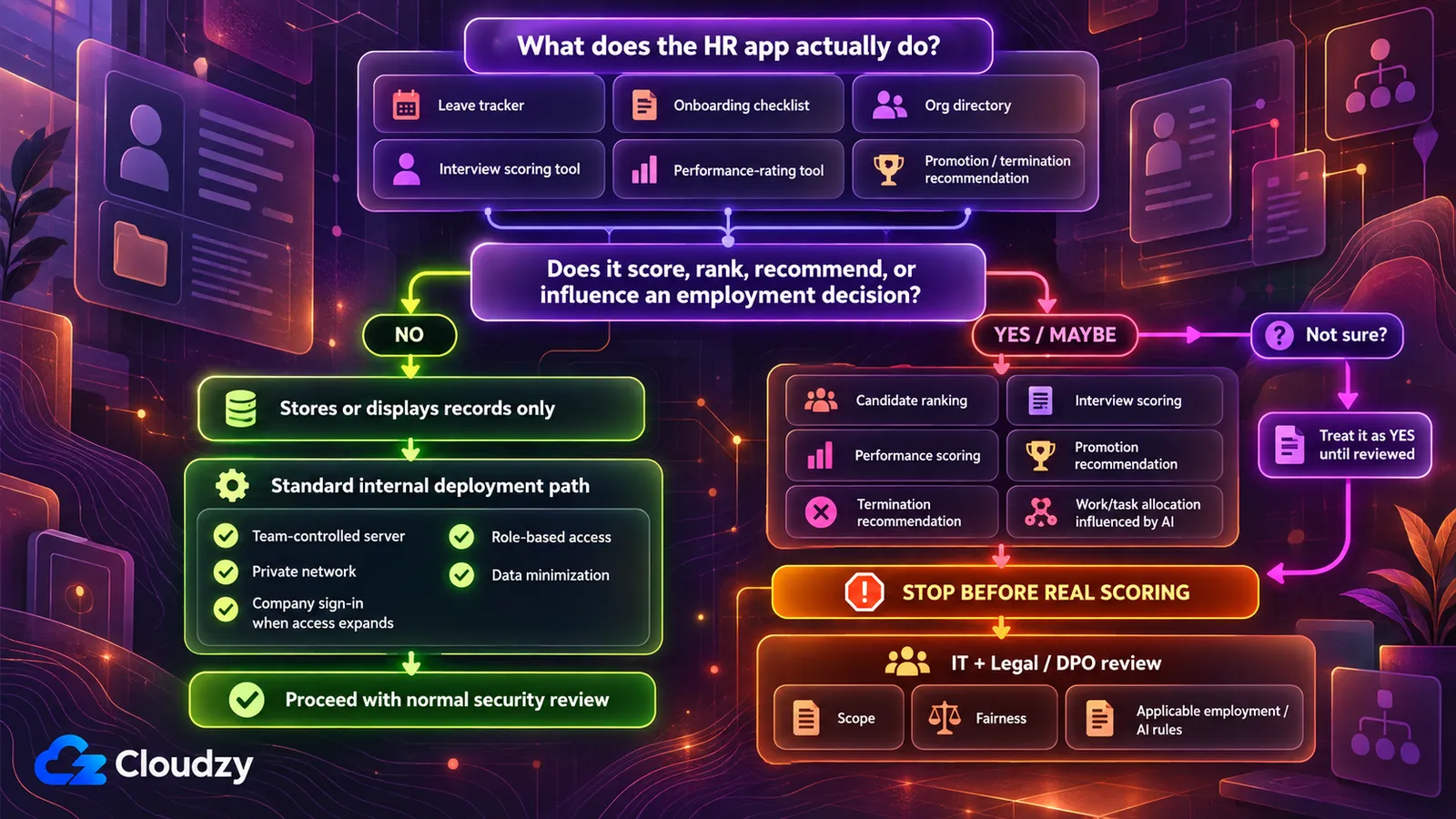
Being built with an AI coding tool doesn't, by itself, make an HR tool high-risk under the EU AI Act. What the tool does determines that. Annex III of the EU AI Act lists AI systems used to recruit or select people and to make decisions on promotion, termination, task allocation, or monitoring and evaluating performance.
So before deciding where the tool runs, ask one question of it: does it make, or influence, a decision about who gets hired, promoted, let go, assigned work, or rated on performance?
A leave tracker, an onboarding checklist or an org directory stores records and shows them back, so it sits on the "no" side. An interview scoring sheet that ranks candidates, or a performance tool that scores people (especially with an AI model doing the scoring), may be on the "yes" side. When I can't tell which side a tool is on, I treat it as a yes and let IT and legal tell me otherwise.
The Act isn't limited to EU companies: Article 2 covers providers and deployers based outside the EU when the output of their AI system is used in the EU. Under Article 113 as amended, obligations for Annex III high-risk systems apply from 2 December 2027. Those obligations include a risk-management system, data governance, technical documentation, record-keeping, transparency to deployers and human oversight (Articles 9 to 14), and assessing them belongs with IT and legal.
If the answer is yes, stop before the tool scores a single real candidate or employee. Take it to IT and to your legal or data-protection lead (the DPO, where there is one). This check doesn't settle whether a specific tool is in scope; it tells you who needs to decide. Some US states regulate automated hiring decisions too, and those rules are in the table further down.
You can give that review a head start. I'd ask the AI tool to argue against its own scoring rather than defend it:
This app scores or ranks job candidates or employees. List every data field and every calculation step that feeds into the score or ranking. For each one, tell me whether it could directly or indirectly track a protected characteristic: age, race, sex, nationality, ethnic origin, disability, pregnancy, religion or sexual orientation. Where you are not sure, say so instead of guessing. Then point out anything about fairness in this scoring that I haven't asked about but should have.
Check: treat the answer as a starting list for the people reviewing the tool, not a verdict, and hand it over along with the tool itself. Running this prompt is not a bias audit, and it doesn't meet any legal requirement.
Where an HR Tool Should Run
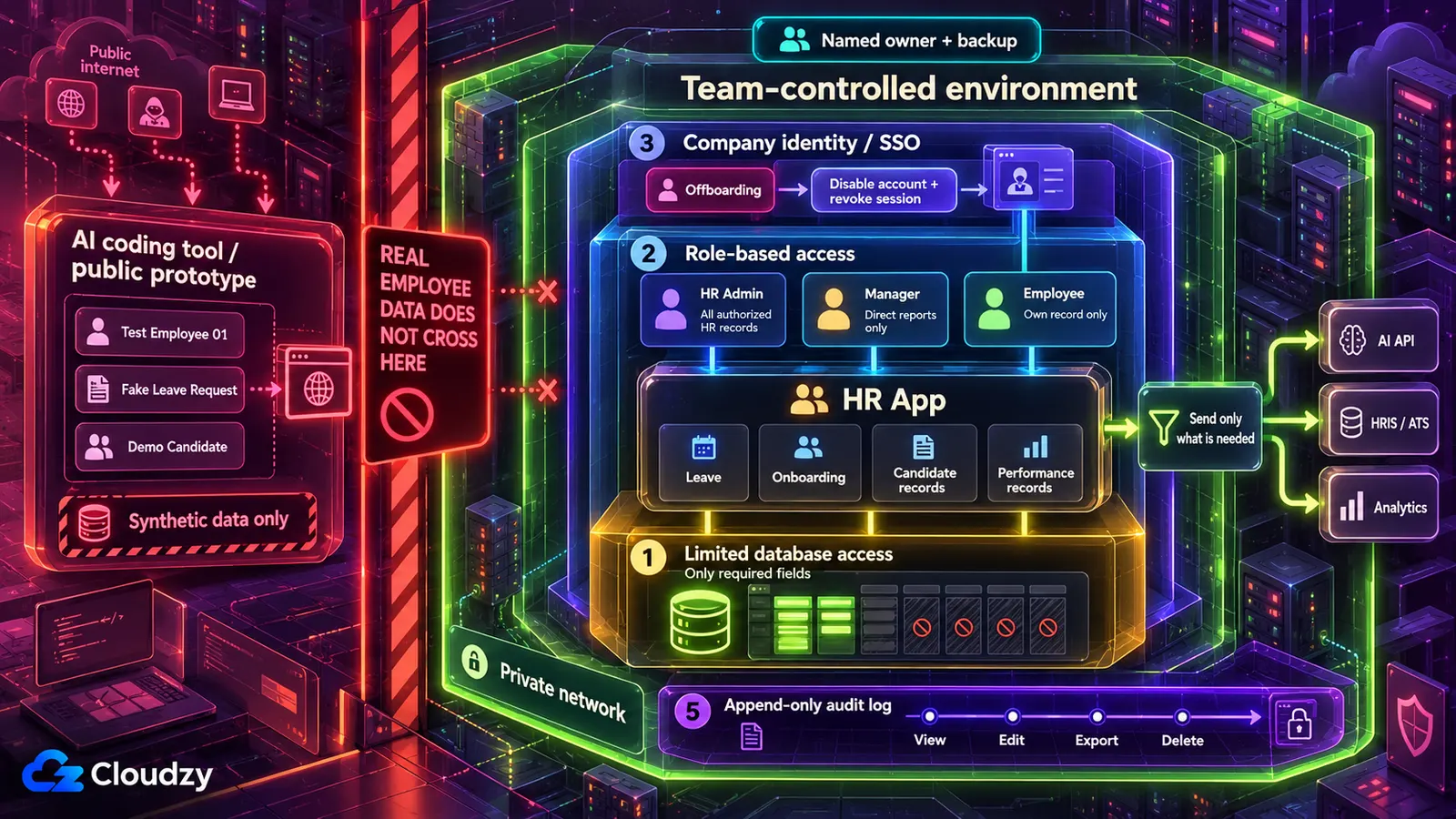
Keep employee records off the AI tool's own hosting. For a tool only the HR team uses, the default is a server the team controls, reachable only on a private network, with company sign-in in front once managers or employees need it. A tool that failed the hiring-decision check, or has no one to own its server, goes to IT.
Publishing on an AI coding tool's own hosting puts the app at an address on the vendor's domain, and unless its visibility is set to private, anyone who finds that address can reach it. RedAccess identified thousands of apps built this way with ordinary Google and Bing searches for those domains. A private network works the other way round, because the tool only answers devices that have joined it. Company sign-in (single sign-on) means colleagues open the tool with the company account they already use, checked by an identity provider, the service that manages those accounts.
| Where it runs | Fits when | Wrong when |
|---|---|---|
| The AI tool's own hosting | Building and testing with fake employee records | Any real record goes in |
| A server the team controls, reachable only on a private network | HR-team-only tools: leave administration, onboarding tracking, headcount planning | Nobody can own the server |
| The same server with company sign-in in front | Managers or all employees need access | Nobody can own the server, or there's no company identity system to connect to |
| A managed deployment platform | Larger organizations that already budget for platform vendors and vendor reviews | A small HR team with no budget line for it |
| IT or internal engineering | The tool failed the hiring-decision check, IT has capacity, or nobody can own a server | Never the wrong choice, only sometimes unavailable |
Until the tool runs on the team's own server, build and test it with synthetic data, meaning made-up names, salaries and leave dates shaped like the real thing. A free tunnel from a laptop to a public address is public in the same way the vendor's hosting is, so it belongs to the demo stage too.
Why a private network and not the login page the app already has? A private network means the tool doesn't answer from outside at all, so nobody outside can load it, probe it or guess passwords. A login page the AI tool wrote isn't enough on its own. Anyone can reach it, and it's only as strong as the generated code behind it. Veracode's 2025 GenAI code security report found that 45% of the code samples it tested, from more than 100 models, failed its security tests with an OWASP Top 10 vulnerability (one from a widely used list of the most critical web-application security risks). That's why I'd rather put a lock in front of the app than rely on the one the AI wrote.
For the hand-off, the tool runs on a VPS (a rented server the team fully controls) under a deploy tool such as Coolify or Dokku, which runs the app from its code; Coolify can also roll a bad update back to an earlier version from its dashboard. Choosing between Coolify and Dokku comes down largely to how many apps the server will run and whether IT help prefers a dashboard. The private network comes from Tailscale or WireGuard. Tailscale is the quicker of the two, but its coordination service is run by Tailscale, while WireGuard is fully self-hosted. Company sign-in comes from an identity provider such as Authentik or Keycloak. A reverse proxy such as Caddy or Nginx Proxy Manager adds HTTPS where sign-in faces the web. This is the part to hand to IT help, together with the checklist at the end.
The Fixes, as Prompts for Your Own AI Tool
Most of the work to deploy an AI-built HR app safely goes through the tool that built it, but only when asked. As security researcher Joel Margolis told Wired, AI coding tools "do what you ask them to do. And unless you ask them to do it securely, they're not going to go out of their way to do that."
Treat every prompt below as a starting point and edit the field names and roles to match your tool. I think of the AI tool as the engineer and myself as the reviewer, so its report that a change is done is a draft. The check under each prompt is the proof, and none of the checks needs you to read code. When a check fails, the fix goes back to the AI tool, and the lesson goes into a rules file for your AI tool so the next session starts from it. Each prompt also asks the tool to flag what it's unsure about; an assistant that admits a gap is more useful than one that sounds certain. Run them against the code and fake records, never with live records or passwords pasted into the chat.
Find the Employee Fields the Tool Touches, Then Lock Out the Rest
You can't lock out a field you don't know the tool holds, so the first prompt is an audit:
Go through this app's database, code, screens and exports. List every field that could hold personal data about an employee or a job candidate: names, employee IDs, SSNs or national ID numbers, tax IDs, dates of birth, home addresses, health information, disability status, accommodation records, immigration or work-authorization documents, salary, bonus, equity, performance ratings and disciplinary notes. For each field, tell me which screen or feature uses it and whether the app's main job needs it. If you can't tell, mark it as uncertain rather than guessing.
Check: open the tool's main screens and exports and make sure every personal-data field you can see there is on the list. A field you can see but the list doesn't mention means the audit missed something, so ask again.
The second prompt takes away what the tool doesn't need. It relies on a database login (the account the app uses to talk to its database), which can be limited to specific fields.
Change this app so it reads only these fields: [list the fields the tool needs]. Remove every other personal-data field from the app's copy of the data, from the code, from every screen and from every export. Then create a separate database login for the app that can read only those fields and change only the data the tool itself writes, such as leave requests. Switch the app to use that login. Report exactly what you changed, file by file, and tell me anything you could not do.
Editing the screens alone isn't enough. If the app's database login can't read the salary column, a bug elsewhere in the AI-written code can't show it either. Whether the data is encrypted at rest is a question for IT, since that lives in the server and disk setup, which an assistant reading the code can't reliably see.
Check: sign in as an ordinary user and open every screen and every export; none of the removed fields should appear. Then ask the IT help who manages the server (or the AI tool, with the output shown to you) to request a removed field while connected as the app's database login. A permission-denied error or an error saying the field does not exist is a pass. A connection, syntax or other unrelated error is not. An empty column or an actual value is a fail. Keep the audit list, because the deletion tool uses it.
Give HR Admins, Managers and Employees Different Views
This is where employee data leaks inward, to the colleague who opens a peer's salary or a teammate's accommodation note. Role-based access control fixes it, and the prompt below spells out where the check has to happen:
Add role-based access control with three roles, checked on the server for every request, not only by hiding buttons or links in the page.
- HR admin: can read and edit all employee records.
- People manager: can read only their own direct reports' records, and never sees salary, medical, accommodation, disciplinary or immigration fields.
- Employee: can read only their own record.
Refuse everything else with an "access denied" (403) response. Take each user's role from their signed-in account, never from anything the user can type or change in the page or the address bar. List every place you added a check, and flag any page or export you are unsure is covered.
Some companies let managers see pay during compensation reviews; if yours does, that's the manager line to change.
Check: create a test manager and a test employee. Signed in as the manager, open a direct report's record, copy its address, change the record number to someone outside the team, and load it: you should get "access denied". Repeat as the employee with a colleague's record number. Then confirm the manager's view never shows the salary, accommodation or immigration fields.
Get Credentials Out of the Code and the Chat
A database password or an HRIS or payroll API token (the long key one system uses to log in to another) can be removed from today's code and still sit in the project's earlier saved versions, which is why the prompt asks about history too. An environment variable fixes the code side. It's a value the server hands the app when it starts, so the code refers to it by name without containing it.
Find every password, API key, access token and database connection string in this project, including any for our HRIS, payroll or email systems. Replace each one in the code with an environment variable, and give me the list of variable names. Make sure files that hold the actual values, such as .env, are excluded from the code repository. Then list every place an old value still appears in the project's history, so I know which credentials to replace.
The prompt can't do the most important step. In the HRIS or database admin console, issue a new credential for every one that ever appeared in a chat or the repository, and switch off the old one.
The team's own copies of those passwords belong in a password manager, such as a self-hosted Vaultwarden server (which option fits a team is its own decision). It stores credentials for people and doesn't feed a running app, which gets its values from the deploy tool. For secrets the running app itself reads, HashiCorp Vault is the heavier option, with central policy and rotation for teams that need them.
Check: ask the AI tool to search the current files for the old values, and read the search results it shows you, not its summary of them. The current files should have no matches. History matches are expected and don't need scrubbing; they're the list of credentials to replace. The proof each one is dead is in the HRIS or database admin console: every old credential shows as revoked, or IT confirms the system refuses it.
See What Employee Data Leaves the Tool
Once a call has sent a candidate's interview notes to an outside service, deleting the record in your own tool doesn't reach the copy that service may keep. So the fix is to send less in the first place.
Audit every external call this app makes: to OpenAI, Anthropic or any other AI API, to any HR system such as an HRIS or ATS, to analytics or error-tracking tools, and to any webhook. For each call, list exactly which employee or candidate fields are included in what is sent. Flag any service that may store or log what it receives, and tell me which calls could work with less data. Mark anything you are unsure about.
Check: create a fake employee or candidate with a distinctive made-up name, then use each feature that makes an outside call (generate the interview summary, trigger the webhook, open the page that loads the analytics script). Open each outside service's own dashboard, such as the analytics tool, the error tracker, the ATS's log of received webhooks, or the AI provider's usage log where it shows requests, and search for that name. It should turn up only where the call needs it. If it turns up anywhere else, send that call back to the AI tool with less data and run the check again. Some dashboards don't show what they received. For those, and for any service that has to keep receiving employee data, take its data-retention terms to the person who signs vendor contracts at your company.
Record Who Opened Which Employee Record
An employee asks who exported the salary sheet last quarter. Without an audit log (a running record of who did what to which record), nobody can answer.
Add an audit log. Every time a user views, edits, exports or deletes an employee record, add a row with the user's ID, the employee record's ID, the action, which fields changed, and the time. Set up the database so the app's database login can add rows to this log but cannot edit or delete them. Only HR admins can read the log in the app. Tell me how the no-edit, no-delete rule is enforced, and where.
"Append-only" has to come from the database login's permissions, not from the app promising to behave. The log is also personal data in its own right, since it shows who looked at whose record, which is why only HR admins read it.
Check: as an HR admin, open a record, then view the log and confirm the entry is there. Have IT or the AI tool (with the output shown to you) try deleting a log row using the app's database login; you should see the permission error itself.
Handle Deletion Requests Without Breaking Retention Rules
What happens when an employee asks for erasure and some of their records are payroll files the company has to keep? The obvious prompt ("delete all personal data for this employee across every table") deletes them anyway, and that breaks two things. Employers often have to keep some records, with payroll, tax and work-authorization files as common examples, and GDPR's right to erasure doesn't apply to the extent processing is needed to comply with a legal obligation or for legal claims (Article 17(3)(b) and (e)). A delete-everything button is also a dangerous feature to leave lying around. The safer version separates "delete on request" from records subject to a retention requirement, meaning records the company has to keep regardless of the request, and it shows its plan before it deletes anything:
Build a deletion-request tool that only HR admins can open. Given an employee ID, it first shows every table and field that holds that person's data, grouped into the categories from the field audit. Each category has a retention setting that an HR admin sets: "delete on request" or "keep: required retention". After an HR admin confirms, the tool deletes only the categories set to "delete on request". It logs only the employee ID, the time, who confirmed, and which categories were deleted or kept, and nothing else about the person. Anyone who is not an HR admin gets "access denied".
The retention settings come from your compliance lead or the DPO, not from the AI tool or the builder's best guess. Mention to them that the audit log keeps the employee ID after a deletion so they can decide how long that identifier should remain. Backups and copies held by outside services need their own retention or deletion process.
Check: create a test employee with records in two categories, one set to "delete on request" and one set to required retention. Run the tool as an HR admin and confirm only the first category is gone. Then open the tool as a manager account and expect "access denied".
Employment Rules to Raise With Your DPO or Compliance Lead
The employment rules an HR tool picks up follow what it does and whose data it holds, not how it was built. This is a list of rules to raise with your DPO or compliance lead, not legal advice, and it doesn't decide whether any of them applies to you.
A leave tracker holding accommodation notes for staff in Germany and California picks up different rules from a headcount planner holding nothing but job titles. The EU AI Act question sits with the hiring-decision check.
| If the tool… | Rule to raise | Official Source |
|---|---|---|
| Uses automated scoring or ranking in hiring or promotion decisions about people in Colorado | Colorado SB 26-189 covers automated decision-making technology used in consequential decisions, including employment, with obligations starting January 1, 2027 | Colorado SB 26-189 |
| Uses automated scoring or ranking in hiring or promotion decisions about people in California | California's automated decisionmaking technology (ADMT) regulations took effect January 1, 2026, but businesses that use ADMT to make significant decisions must comply with the ADMT-specific requirements beginning January 1, 2027 | CPPA's ADMT regulations |
| Uses AI in recruitment, hiring, promotion, discipline, discharge or other employment decisions in Illinois | Illinois HB 3773 amended the Illinois Human Rights Act from January 1, 2026: employers may not use AI in a way that discriminates against protected classes, or use zip codes as a proxy for them, and must notify employees when they use AI for these decisions | Illinois Public Act 103-0804 |
| Holds health, disability or accommodation records of people in the EU | GDPR Article 9: health data is a special category, and processing it is prohibited unless an exception applies, including processing necessary for employment-law obligations (Article 9(2)(b)) | GDPR Article 9 |
| Holds any personal data about employees or candidates in the EU | GDPR Article 6: each use needs a lawful basis, a legal ground such as a contract or a legal obligation | GDPR Article 6 |
| Holds data about UK staff | UK GDPR, with the ICO's guidance on employment information | ICO employment guidance |
| Holds data about employees or job applicants in California | CCPA/CPRA: if the organization is a business subject to the CCPA, the exemption for employee and applicant data expired on January 1, 2023, so employment-related personal information is generally within scope | California DOJ CCPA page |
A server's location decides where the records physically sit; it doesn't by itself satisfy any rule above. For staff outside these places, start with the relevant national, state or local privacy or employment regulator, or your legal or compliance lead.
Access Ends When Employment Ends
When a leaver's company account is switched off on their last day, their email, calendar and files close in one step. The HR tool should close in that same step, and behind company sign-in, it can, as long as offboarding also revokes active sessions. Any tool that isn't behind sign-in goes on the offboarding checklist as its own line, so someone removes that account by hand.
The builder is a leaver too, eventually. When the person who built the tool leaves or changes role, ownership passes to a named successor who can sign in as admin and knows where the server is, and the builder's own admin login is closed. I'd name that successor before go-live, because a notice period is a bad time to go looking for one.
On a set schedule, review who holds each role and whether the tool is still in use. When access needs to grow, widen it one rung at a time (the HR team, then managers, then every employee) and run the address-bar test again at each rung. When the tool is no longer used, retire it: switch off its database login and credentials, delete its data according to the retention settings from the deletion tool, stop it, and remove it from the private network or the sign-in system.
The named successor inherits a server someone had to stand up, with a deploy tool, a private network and, for wider access, company sign-in. Our Linux VPS gives root access, and Coolify, Tailscale and Authentik each deploy as a one-click app, so IT help can spend its hours on the checks. Locations include Frankfurt and Amsterdam in the EU, London in the UK and several US cities. That settles which country the server is in, an input to the DPO conversation, not a substitute for it.
The Go-Live Checklist
Each item below is either done or not done before employee records go in, and this is the list to hand whoever sets up the server.
- The hiring-decision question is answered, and any "yes" has gone to IT and legal.
- The tool runs on a server the team controls, not on the AI tool's hosting.
- It's reachable only on the private network or through company sign-in.
- The app's database login reads only the listed fields.
- A test manager and a test employee both get "access denied" on the address-bar test.
- Every credential that touched a chat or the code has been replaced, and the old one revoked.
- The outbound-data audit is done and unneeded fields are cut.
- The audit log records views, and the app's login can't edit or delete it.
- Retention settings and the employment rules have gone through the DPO or compliance lead.
- One named owner and a named backup exist.
Frequently Asked Questions
What Is Shadow AI in HR?
Shadow AI in HR is the use of AI tools, or apps built with them, on HR data without IT's knowledge or approval. The Sapient Insights 2026 Annual HR Systems Survey, as reported by Cornerstone OnDemand, found over 80% of HR professionals use personal AI tools daily, while 3% use the AI embedded in their HR systems.
Can I Use Real Employee Records While Building the Tool?
No. Keep real records out of the chat while you build a vibe-coded HR tool. Pasting them into a chat assistant is a separate risk from deploying the app, and it happens the moment you paste, whether or not the tool ever goes live. Build on fake records until the tool runs on a server the team controls.
Do Employees Have to Consent to an HR Tool Using Their Data?
Usually consent is the wrong basis. The EDPB's guidelines on consent say it "deems it problematic for employers to process personal data of current or future employees on the basis of consent as it is unlikely to be freely given." Which lawful basis applies under GDPR Article 6 is a question for your DPO.
Does HIPAA Cover the Medical Notes in an HR Tool?
Usually not. HIPAA's definition of protected health information excludes information in employment records held by a covered entity in its role as employer (45 CFR 160.103). That doesn't make those notes unregulated, so ask your compliance lead which rules do cover them.

Discussion
Comments
Sign in to join the discussion.