
In March 2025, federal prosecutors tied a crypto seizure to a theft that began with the LastPass breach. Victims had stored seed phrases in Secure Notes, attackers had taken encrypted vault data in 2022, and weak master passwords were cracked offline later. Read reporting on the case.
That story did not create the self-hosted password manager category, but it did push more people toward it.
This article skips the usual feature dump. It gives you the pick for solo use, small teams, and orgs with audit needs. It also covers the two parts most guides leave out: backups and migration.
The Direct Answer
- Solo user, family, or homelab: Vaultwarden on a small VPS. It uses the official Bitwarden clients, stays light, and keeps the setup simple.
- Small team or shared-credential workflow: Vaultwarden Organizations for mobile-heavy teams, or Passbolt if shared credential work is the real reason you are self-hosting.
- Organization with audit or compliance needs: Bitwarden's official self-hosted server. It is heavier, but it has the audit trail and vendor support most orgs need.
- No matter which one you choose: A backup you have never restored is not a backup. Test a cold restore on a blank machine.
What Self-Hosting Means
The encryption model does not change. Encryption still happens on the client. The server stores ciphertext it cannot read. The difference is who runs the server. With cloud Bitwarden, Bitwarden runs it. With Vaultwarden or Bitwarden self-hosted, you do.
This is not the same thing as a secrets manager like HashiCorp Vault, Doppler, or AWS Secrets Manager. Those tools serve apps. Password managers serve people.
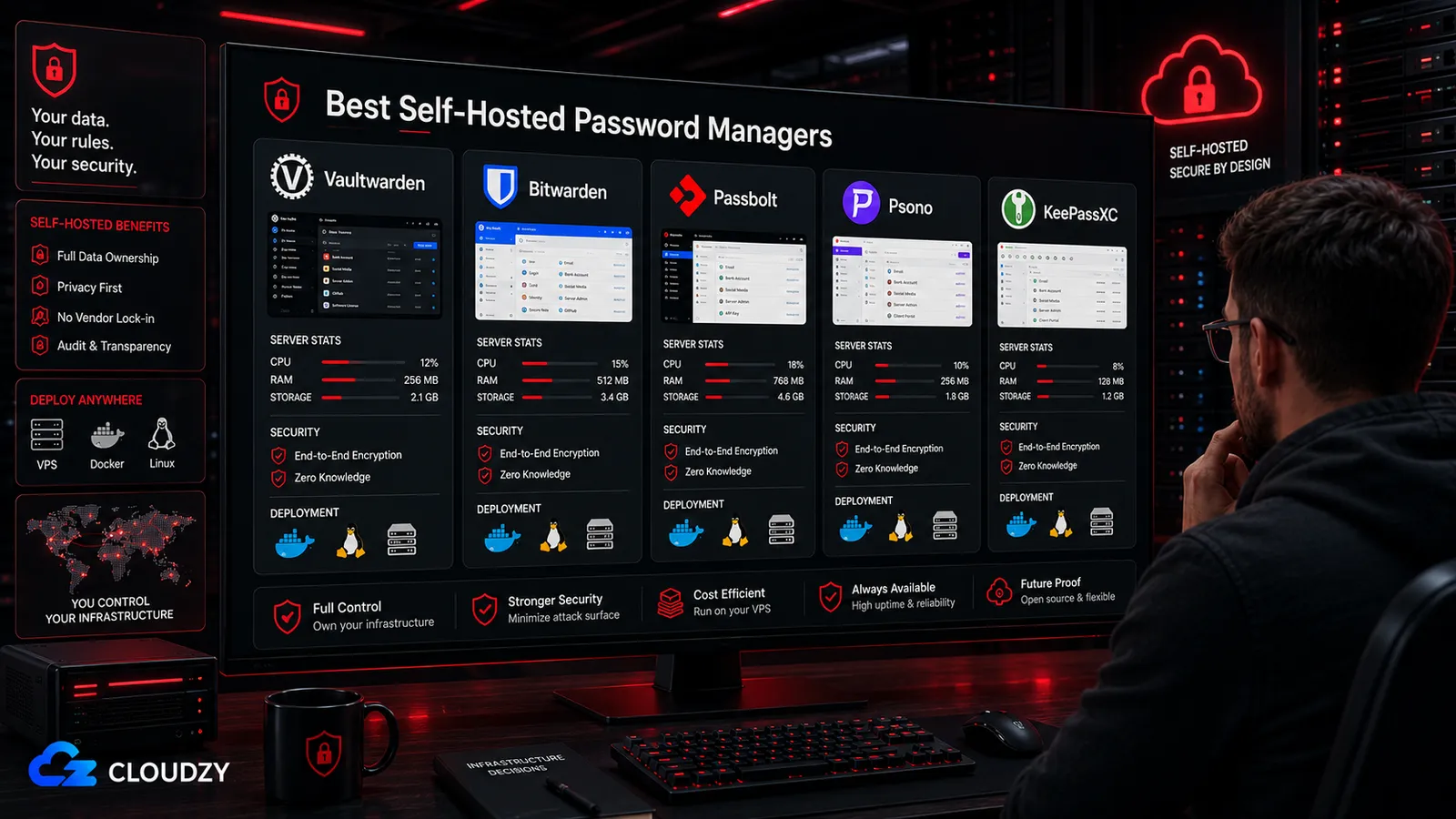
What is in scope here: Vaultwarden, Bitwarden self-hosted, Passbolt CE, Psono, and KeePassXC with Syncthing as the no-server option.
The Five Tools at a Glance
| Tool | Stack | Typical footprint | Audit status | Best for |
|---|---|---|---|---|
| Vaultwarden | Rust, single Docker container | ~50 MB idle | No formal third-party audit | Individuals, families, small teams |
| Bitwarden self-hosted | .NET, multi-container stack | ~2 GB idle | Published third-party audits | Orgs that need audit history |
| Passbolt CE | PHP / MariaDB / NGINX | ~512 MB working | Third-party audited | Team-first credential sharing |
| Psono | Python / PostgreSQL, multi-container | ~512 MB+ | Partial audit history | Teams that want an enterprise-style sharing model |
| KeePassXC + Syncthing | Local DB + peer sync | No server | Independent reviews published | Single users who want no server at all |
Vaultwarden
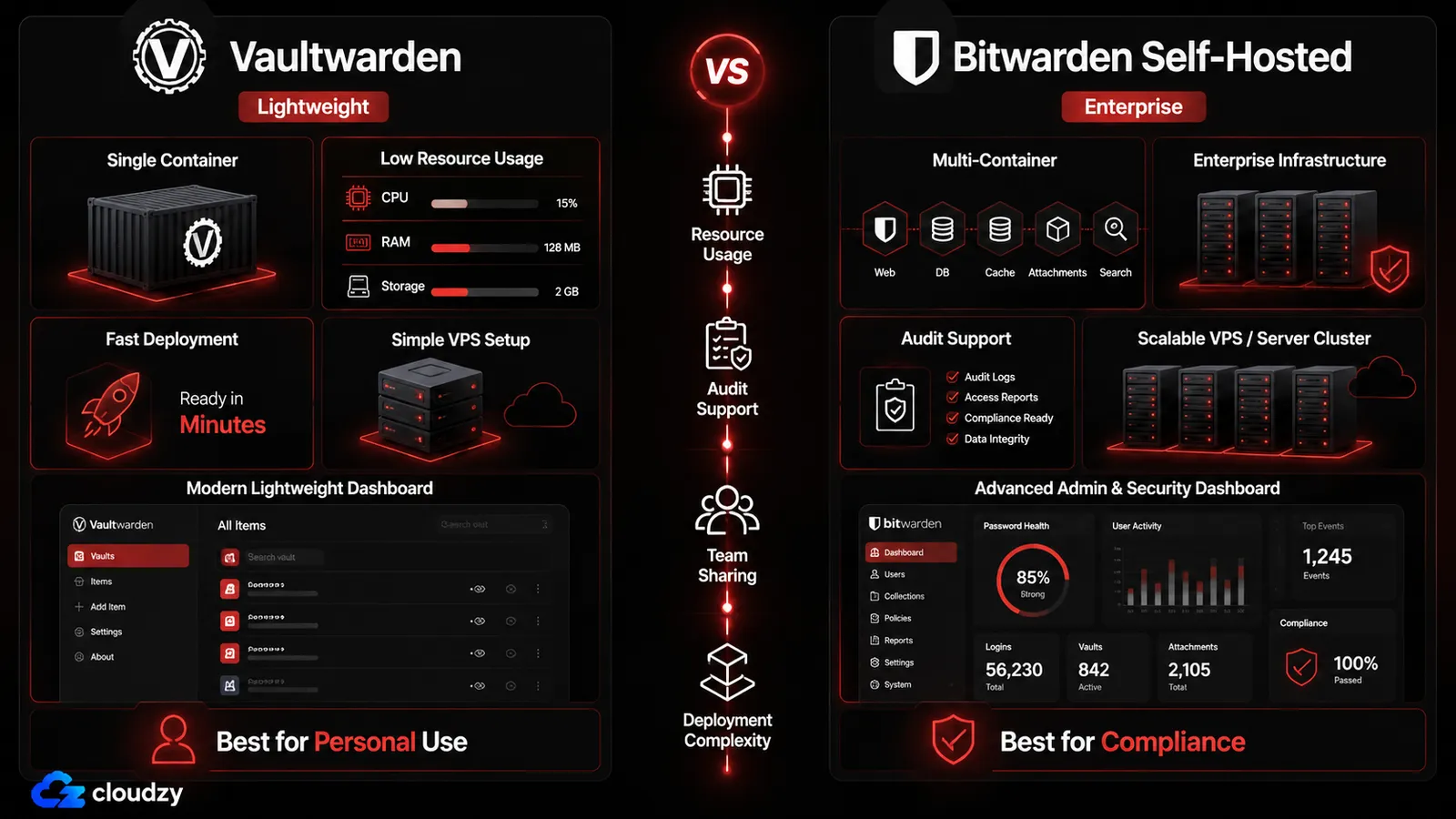
Vaultwarden is a Rust rewrite of the Bitwarden server. It uses the official Bitwarden clients, so the day-to-day experience feels the same as cloud Bitwarden. It runs in one Docker container and keeps resource use low.
The trade-off is simple. Vaultwarden has no formal third-party security audit. That does not make it bad. It just means the trust model is different.
For solo users, couples, and families, that trade-off is usually fine. For mobile-heavy teams, it is still a solid fit if they mostly use personal vaults with a few shared collections.
A small VPS is enough for most Vaultwarden setups. Around 1 GB is the sweet spot for a personal vault. For a small household or a team with a little extra activity, 2 GB gives more breathing room.
Keep it updated. Bitwarden client changes can break older Vaultwarden builds for a short time, so do not let the server drift for months at a time.
Pick: Vaultwarden for most personal use cases.
Bitwarden Self-Hosted
Bitwarden self-hosted is the full vendor stack. It is heavier than Vaultwarden, but that is the price of getting the exact Bitwarden server model, published audit work, and a support path that feels easier to defend in front of procurement or security reviewers.
Bitwarden publishes third-party assessment work across its products.
This is the right pick for orgs that need to answer questions with dates and reports, not hand-waving. It also needs more room. A small org should plan for a 4 GB VPS as a starting point, with more headroom for larger teams or heavier backup jobs.
Pick: Bitwarden self-hosted when audit history matters more than a lean stack.
Passbolt CE
Passbolt is built around teams from the start. Its sharing model is more granular than what most personal-password-manager setups offer, and that is the point. It works best when shared credentials are the main job, not an afterthought.
The downside is the mobile story. Passbolt is still desktop-first in practice. Offline disaster access mode is on the roadmap, but it is not the same as having a mature offline experience today.
Passbolt also wants more machine than Vaultwarden. A 2 GB VPS is the floor, and 4 GB is a safer place to start for a real team stack.
Pick: Passbolt CE when shared credential workflow is the whole reason you are self-hosting.
Psono
Psono sits in the middle. It has an enterprise-style sharing model, separate admin and user portals, and a structure that makes group access easier to manage than a plain personal vault.
It is less common than Vaultwarden, Bitwarden, or Passbolt, so the community is smaller.
Psono makes sense for teams that want something more structured than Vaultwarden Organizations, but do not want the mobile trade-offs that come with Passbolt.
Pick: Psono for teams that want a more enterprise-like sharing model without jumping straight to Bitwarden self-hosted.
KeePassXC + Syncthing
This is the no-server path. KeePassXC stores credentials in a local encrypted .kdbx file. Syncthing copies that file across your devices. No server. No API. No Docker. No monthly bill.
The trade-offs are real. There is no proper team sharing. Conflict handling gets messy if two devices write at the same time. There is no web vault, so borrowed-machine access is off the table.
This is the right answer for a single user with two or three devices who does not want to run infrastructure.
Pick: KeePassXC + Syncthing for the no-server crowd.
Backup Rules That Matter
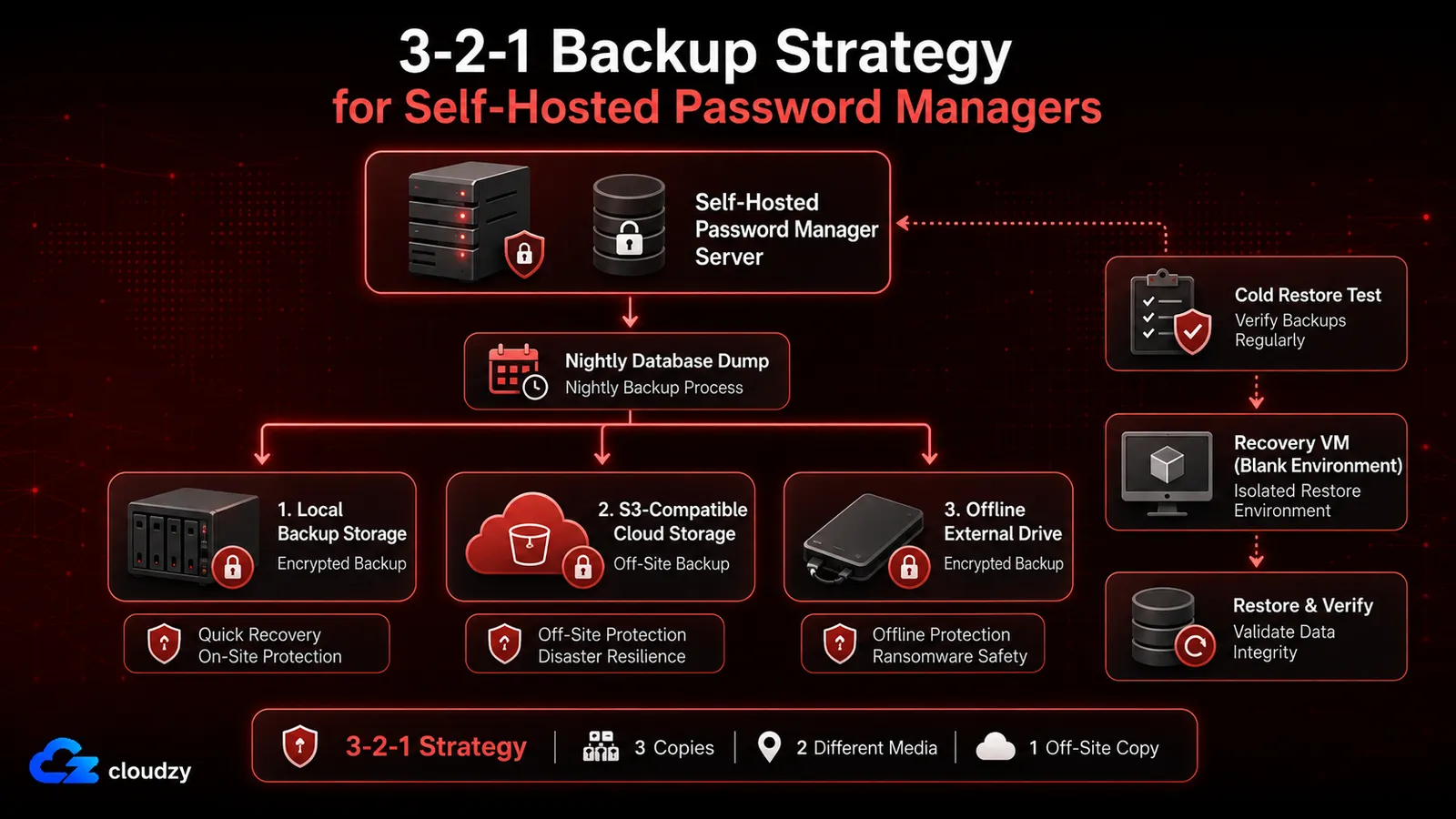
A self-hosted password manager is only as good as the restore process behind it.
The safest approach is plain:
- keep three copies of the data
- store them on two different kinds of media
- keep one copy off-site
A simple setup works fine. Take a nightly database dump, copy it to S3-compatible storage, and keep a second copy on removable media that stays somewhere else.
Then do the part most people skip. Restore a backup to a blank VM and log in. If that works, you have a backup. If it does not, you have a file you hope works.
Migrating from LastPass, 1Password, or Bitwarden Cloud
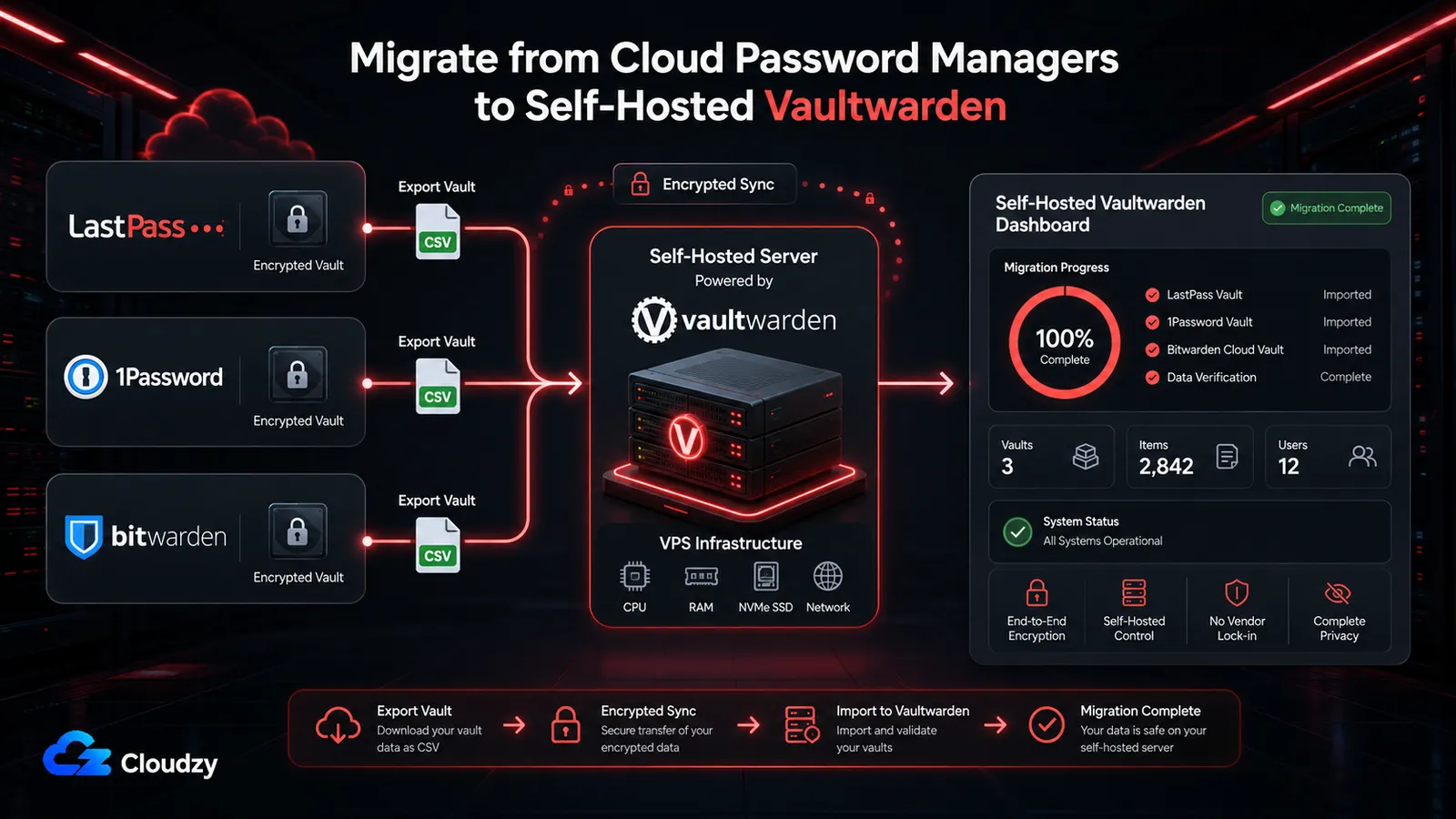
The easiest move in this list is Bitwarden cloud to Vaultwarden. Change the server URL in the client, log in, and sync.
LastPass to Vaultwarden takes more work. Export the LastPass vault to CSV, import it through the Bitwarden client, and then point that same client at your self-hosted server.
Three things need attention:
- Attachments come out separately from CSV. Re-upload them by hand.
- Folder structure may shift. Do a quick pass before you trust the new layout.
- TOTP seeds need checks. Log in to a few accounts before you delete the old vault.
The universal rule is simple: do not delete the source vault for 30 days.
Which One Fits Which Reader
If you want the smoothest path for personal use, pick Vaultwarden.
If your team needs shared credentials and lives on desktop, Passbolt is the clearest fit.
If audit history and vendor support matter most, Bitwarden self-hosted is the safer choice.
If you want no server at all, KeePassXC plus Syncthing is the cleanest escape hatch.
Wrapping Up
Pick the setup that matches your use case, deploy the matching tool, and move on.
The next step is the cold-restore test. Spin up a blank VM, restore your latest backup, and log in.
Frequently Asked Questions
What is the best self-hosted password manager?
Is Vaultwarden safe to use without a security audit?
What is the difference between Vaultwarden and Bitwarden self-hosted?
What happens if my self-hosted password manager goes down?



Discussion
Comments
Sign in to join the discussion.