
Several of the tools on a typical open-source RPA shortlist cannot run on a bare Linux server. They automate desktop interfaces and depend on a graphical session, while a bare server has no desktop session to control. That one property splits the category in two, and it settles where your bot can live.
Commercial RPA licensing is what drives most searches for the best open source RPA tools. I checked the license, activity and package records below again on 5 October 2026, and each status claim links to the record it came from.
Key Takeaways
- Start with the session requirement, not the feature list. Oculix, OpenRPA and taskt are GUI-first and need a graphical session for local desktop work. RPA Framework does not, for browser, file and data work. TagUI and UI.Vision depend on which mode you run.
- RPA Framework shipped releases in February, March, May, June, August and October of 2026, the most consistent release record verified here.
- TagUI is Apache-2.0 and still takes contributions, but AI Singapore has discontinued maintenance and support of it. Its Python wrapper has had no release since July 2023.
- Automagica and OpenBots do not belong on a current shortlist. Automagica stopped being AGPL3 when Netcall acquired the company in October 2020, and OpenBots has no maintained public repository for an RPA product.
- If the systems you are joining already expose APIs or webhooks, you want workflow automation, not RPA. Different category, different tools, much shorter build.
What This Article Doesn't Cover
Three adjacent questions are out of scope, each for its own reason.
- Commercial platforms with free tiers. UiPath Community Edition and Power Automate's free plan are a separate decision from the one here.
- Installation and configuration. Nothing below is a setup guide, and no tool here gets a command line.
- AI computer-use agents. One tool on the list ships an integration with one, and that gets a sentence, not a comparison.
The Open-Source RPA Tools Still Under Maintenance
The six projects below clear the bar used here: genuinely open-source RPA software with public activity since mid-2025. Free RPA tools that stopped being maintained are still free, so the column that earns the most attention below is the dated one, not the license one. The other columns answer what each tool automates and what it needs from the machine underneath.
| Tool | License | Last Verified Activity (5 Oct 2026) | What It Automates | Needs a Desktop Session? | Runs On |
|---|---|---|---|---|---|
| RPA Framework | Apache-2.0 | PyPI 33.0.2 on 2026-10-04; commit 2026-10-04 | Browser, APIs, files and data, plus desktop modules | No, for browser, API and data work | Anywhere Python runs |
| UI.Vision RPA | AGPLv3 or commercial | Repo updated 2026-10-02; V10.0.276 source 2026-09-21 | Browser natively; desktop through XModules | Yes, for desktop work | Windows, macOS, Linux |
| Oculix | MIT | Repo updated 2026-10-01; SikuliX upstream archived March 2026 | Anything visible on screen, by image recognition | Yes, or a remote/virtual display | Windows, macOS, Linux |
| TagUI | Apache-2.0 | Commit 2026-09-20; PyPI rpa 1.50.0 on 2023-07-07 |
Browser and desktop | Only for visual and desktop steps | Windows, macOS, Linux |
| OpenRPA | MPL-2.0 | Commit 2025-06-03; latest tagged release 2025-06-03 | Windows desktop work with orchestration | Yes | Windows |
| taskt | Apache-2.0 | Dev-branch commit 2025-07-26; release v3.5.0.0 on 2020-05-14 | Windows desktop, recorder-based | Yes | Windows |
rpaframework is a collection of libraries, not an application. You write Python or Robot Framework and import the pieces you need, which is a steeper start than recording a macro and a much gentler one to maintain. Its repository describes it as optimized for Control Room, the commercial orchestration product Robocorp built around it. A Sema4.ai crewmember in an r/rpa thread describes Robocorp as now part of Sema4.ai and states the boundary plainly. The library is Apache-2.0, the platform is not. The ownership changed and the boundary did not. The Robot Framework underneath is also Apache-2.0 and not a separate thing to shortlist.
UI.Vision's browser extension is the open-source core. Desktop automation is a separate download, a local app called XModules that gives the extension image and text recognition so it can click things outside the browser. The license is dual (AGPLv3 or a commercial agreement). If you modify the open-source core and do not want to comply with AGPLv3's source-sharing terms, the commercial license is the alternative.
taskt is the awkward entry. Its development branch took a commit in July 2025, and its last tagged release, v3.5.0.0, went up in May 2020. Commits and releases are different signals, and going that long without a versioned build does not mean the existing build stopped working.
SikuliX needs a footnote of its own because the name has effectively become the legacy line. Its original upstream was archived in March 2026, and the oculix-org mirror points current users to Oculix, the active MIT-licensed continuation. That makes Oculix the project to shortlist now; SikuliX1 is useful as lineage and compatibility context rather than as the maintained entry.
Two entries keep appearing on shortlists and should not be there. Automagica's own README announces that Netcall acquired the company on 13 October 2020 and that the robot is no longer available under AGPL3, while OpenBots' public GitHub organization holds a static-site repo and a terminal-emulation library and no RPA core.
GUI-Dependent or Headless: The Split That Decides Your Server
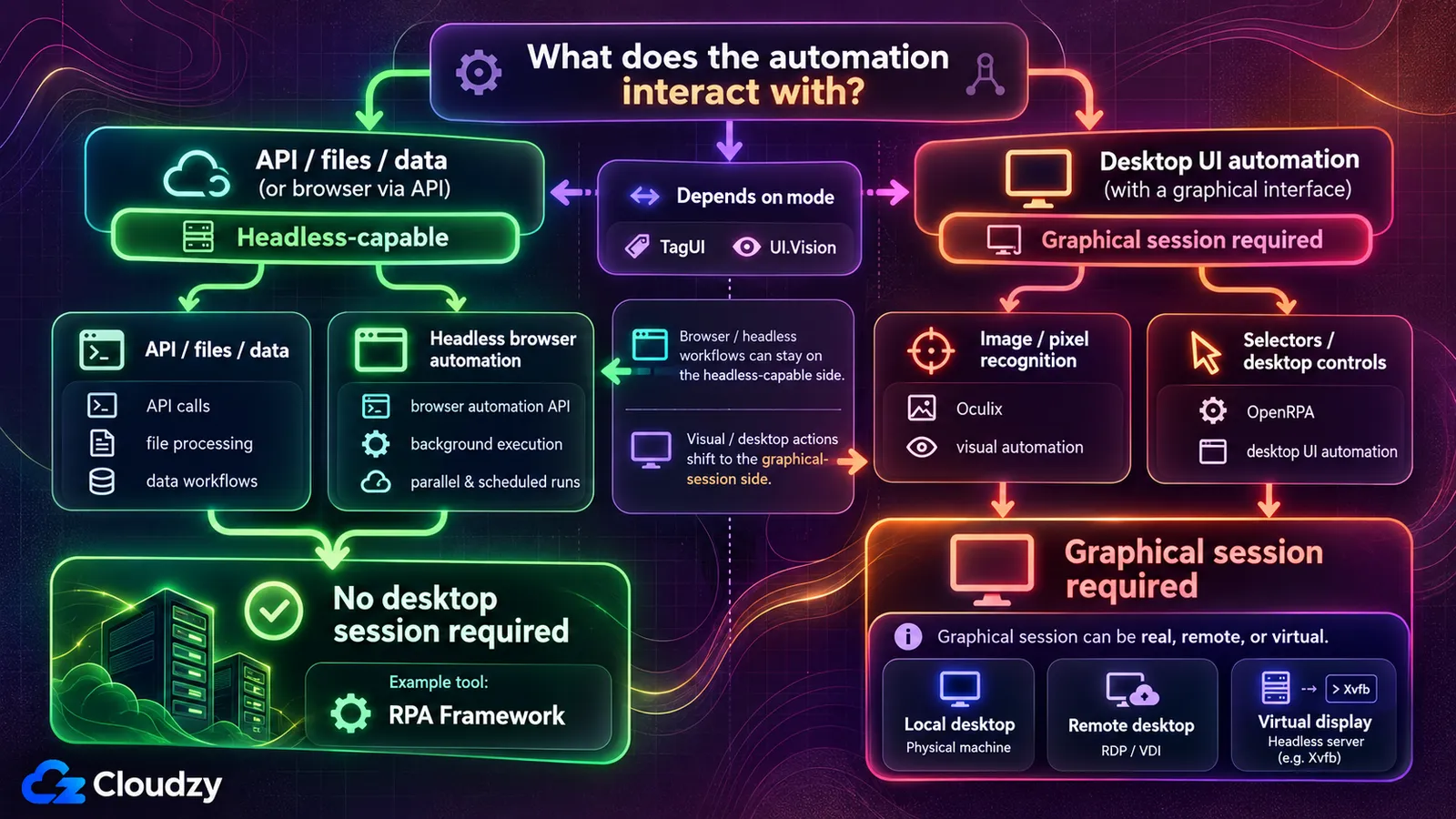
An open-source RPA tool needs a desktop session when the workflow depends on desktop UI automation. API, file and data automation can run headlessly, and browser automation can too when the browser runs in headless mode. Image-recognition tools additionally need pixels to inspect, but desktop automation can still depend on a graphical session even when it identifies controls through selectors instead of images.
A desktop session is the logged-in graphical environment a user gets after signing in: a screen, a window manager, a mouse pointer with coordinates. Headless means the opposite, a machine running with no display attached. Most Linux servers you rent arrive headless by default.
The split follows from what the automation depends on. Oculix, like SikuliX before it, uses computer vision to locate a button by matching a stored image against the pixels currently on screen, so it needs a graphical surface to inspect. A browser driven through an automation API can run headlessly with no desktop display. Selector-based desktop automation is different again: it may identify controls rather than pixels, but it can still depend on a graphical desktop environment. For open source RPA on a server, the practical question is whether the workflow needs a graphical session.
TagUI and UI.Vision sit on both sides, and which side depends on the mode you use. TagUI's own reference documentation says its -headless option runs a flow with an invisible Chrome browser and does not work for visual automation. UI.Vision's browser work runs inside an extension, while its desktop work runs through XModules, which recognizes images on screen and therefore wants a screen to recognize them on.
A virtual display closes part of the gap. Xvfb is a standard way to give a headless Linux machine an in-memory display that graphical programs can draw into with nobody watching, which makes screen-driven automation possible on a server with no monitor. It will not make a Windows-only tool run on Linux, and it adds one more layer that has to keep working at three in the morning.
A license and a commit date tell you whether a tool will be around next year. The session requirement tells you whether you can run it at all.
Where Each One Runs
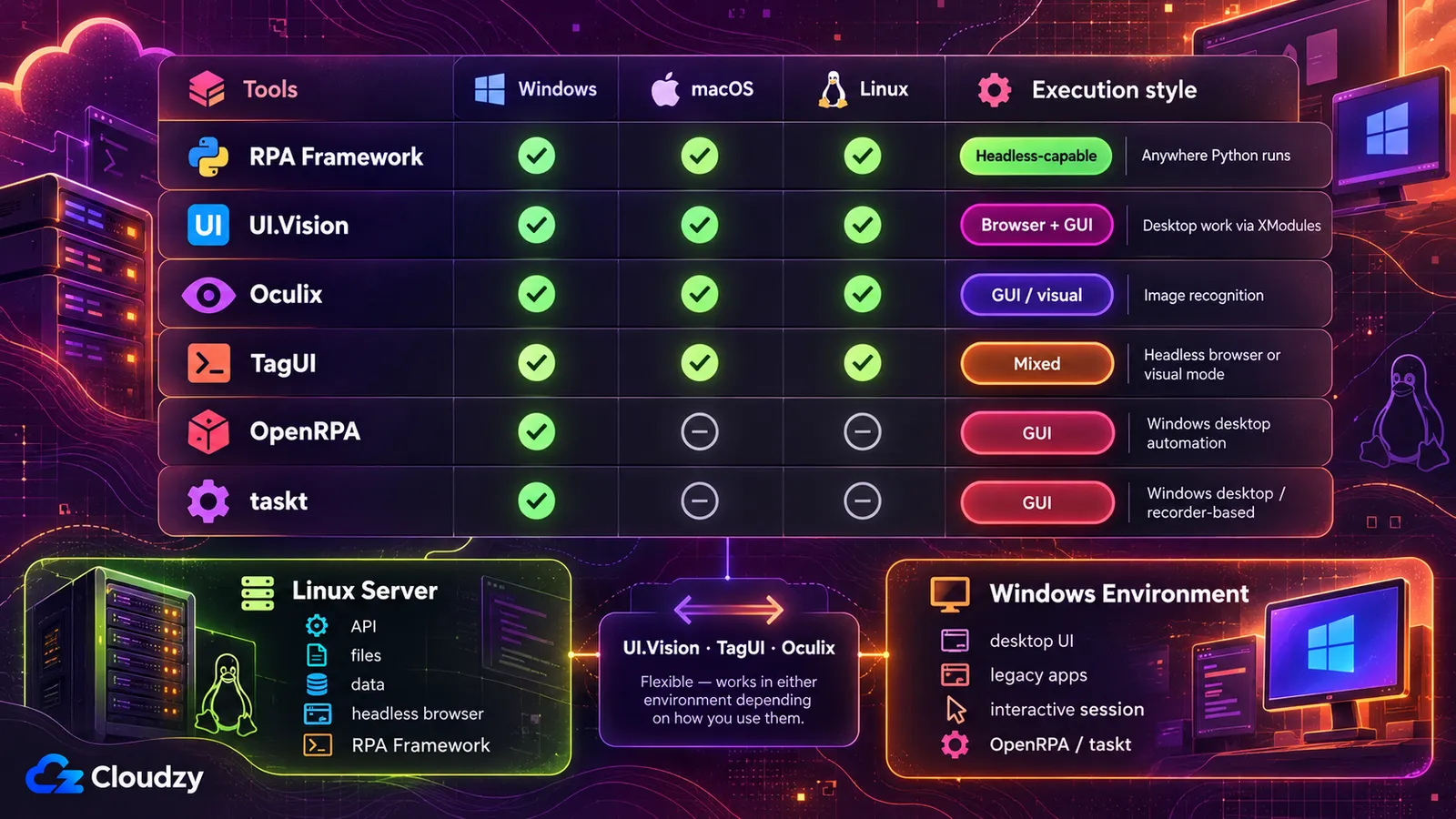
A screen-driven bot needs a graphical session it can control, whether that is a real desktop, a remote session or a virtual display. A headless bot does not. Both sound trivial until the bot has to fire at 3 a.m. with no one at the keyboard.
Self-hosted RPA carries one operational requirement that survives every tool choice: the machine has to be in the right state when the schedule fires. On Windows that state is specific, and Microsoft documents it precisely for its own product. Microsoft's guidance for Power Automate's unattended desktop flows says the product creates a remote desktop session on the target machine to run the flow, that connecting to the machine's console session is not available for unattended runs, and that a Windows 10 or Windows 11 device cannot run one if a user session is present, even a locked one. On Windows Server, a locked session open under the same user as the connection returns an error instead.
That is one vendor's implementation, not a law of Windows, and it is a useful map of the failure modes, because every screen-driven bot has to solve the same problem. Something has to own an interactive session, and your own logged-in desktop is usually the thing standing in the way. On Linux the equivalent problem is smaller but not absent: a job that survives your SSH session closing needs a scheduler and a service manager, not a terminal you left open.
Windows Server handles sessions differently from the desktop editions. Its RD Session Host role runs session-based desktops on one machine for multi-session efficiency, so a bot session and your own session can coexist. If you use RD Session Host for multi-session operation, each connecting user or device needs an RDS CAL, which is a cost to price in early, not a detail to discover late.
Sizing is undemanding. I would not provision more than 1 vCPU and 2 GB of RAM for a bot that clicks through a form and writes a file out. I would give anything driving a full browser 2 vCPU and 4 GB or more, particularly across several tabs, because Chrome is the expensive part of that workload rather than the automation tool sitting on top of it.
An old machine in a closet clears that bar. It has to stay powered on, stay logged in, and not be the laptop you close at night. A rented server removes that class of problem, since it can stay on independently of your laptop and is not competing with the desktop session you work in.
If renting the machine beats maintaining one, the split maps onto two products cleanly enough. A Windows VPS running a Desktop or Server image gives a screen-driven bot a dedicated Windows environment, and a Linux VPS covers the headless side, with both of them running whether or not your laptop is open.
Which One to Pick
If the task lives in a browser or in files and you can write Python, RPA Framework is the pick and the rest of this section is edge cases. The answer flips the moment the task touches a desktop application with no API, because then you need a tool that can interact with a graphical desktop, and the shortlist gets shorter and older.
For browser, file and data work on a Linux server, pick RPA Framework. It runs headless, it lands on a box with no display without extra machinery, and it shipped a new version as recently as October 2026. The price is that you write Python or Robot Framework instead of recording a macro, which costs you on day one and pays you back every time the target application changes.
For a legacy Windows application with no API, where you want visual automation rather than writing a full automation codebase, pick UI.Vision, with the condition attached. It is committing this year, which not every desktop-capable option here is, and the AGPLv3 half of its dual license brings source-sharing obligations if you modify and distribute the open-source software. taskt is the second choice here. Its development branch is alive, its last tagged release went up in May 2020, and that gap between a project that takes commits and a project that ships versions is the thing to weigh.
For visual automation of whatever happens to be on screen, cross-platform, pick Oculix, the active continuation of SikuliX. It is still image-first rather than selector-first, but the project now has an IDE and active releases instead of being just a set of image-matching primitives. Use it when the target is pixels rather than a DOM or accessibility tree, and treat the archived SikuliX1 repository as the legacy line rather than the maintained product.
TagUI keeps getting recommended for a reason. Its scripting language reads close to plain English and the learning curve is the lowest of the six. The counterweight is printed in its own README, which states that AI Singapore has discontinued maintenance and support of TagUI while the project continues under open-source contributors and the community. That is not abandonment. Contributors still land fixes on the default branch and the repository is not archived. It is also not momentum, and the rpa Python wrapper on PyPI is years behind the commit log. Pick TagUI for a task you can afford to freeze, not for a platform you plan to extend for three years.
OpenRPA is the harder call. It has genuine orchestration features under MPL-2.0, but its last code commit and its newest tagged release both date from June 2025, and the only repository activity since then is automated dependency branches. That is not abandonment, since nothing is archived, but nothing has shipped either. Weigh that gap against how long the bots need to keep running.
When a Dedicated RPA Tool Is the Wrong Answer
The strongest argument against everything above came from someone who does this work. In an r/selfhosted thread started by an operator trying to escape a commercial RPA contract, a reply argues for Python plus an automation framework such as Selenium instead. More effort to build, less breakage once built, and a lower ongoing cost of ownership than the RPA software that commenter had used. A separate commenter in the same thread agrees independently.
The threshold is maintenance. If the task will run for years, if the volume is high, and if you or someone on your team can keep a small codebase alive, write the code. Selenium and Playwright cost more on day one and less on day four hundred, because a script you wrote breaks in ways you can read. If the task has a horizon of months, or if nobody on the team writes code, the RPA tool's shorter path to a working bot is worth the fragility.
Recorder output is the part that ages worst. A script generated by watching you click is bound to the layout it was recorded against, so a redesigned page or a moved button breaks it in a way the error message rarely explains. Skepticism about the category runs deeper than that in places: one commenter in an r/rpa thread on open-source options calls RPA repackaged scripting sold to non-technical managers, and for a narrow enough task that is not an unfair description.
There is also a category error worth catching early. If the systems you are joining expose APIs or webhooks, you do not want RPA at all. RPA drives a user interface because there is no other door in, while workflow automation calls the door directly, which is faster to build and far less fragile. That is another toolset with its own cost curve, and n8n's license and what it costs to self-host is the first thing to settle there. n8n, Node-RED, Apache Airflow, Kestra and Dagu are all one-click apps on our marketplace if you want one running today.
UI.Vision's current site advertises an Anthropic Computer Use integration, so the category is already absorbing agents that drive a screen by reasoning about it instead of matching stored images.
Frequently Asked Questions
Is UiPath Open Source?
No. UiPath is a commercial platform, and its Community Edition grants free use rather than published source. UiPath's Community Agreement sets the terms, including a bar on decompiling and reverse-engineering the software. The open-source UiPath alternatives are the projects whose code ships under Apache-2.0, MIT, MPL-2.0 or AGPLv3.
Is TagUI Still Maintained?
Not by its original maintainer. TagUI's README states that AI Singapore has discontinued maintenance and support while the project continues under open-source contributors and the community. The repository is not archived and still takes commits, and the newest default-branch commit is dated 20 September 2026, though the branch sat unchanged between March 2025 and that fix. The rpa Python wrapper on PyPI remains version 1.50.0, released 7 July 2023.
Can You Run an RPA Bot on a Linux Server With No Desktop?
Yes, for API, file and data automation, and for browser automation configured to run headlessly. Desktop UI automation generally needs a graphical session. On Linux, image-driven workflows can sometimes run on an otherwise headless server if you provide a virtual display such as Xvfb.
Is RPA Framework Still Open Source After Robocorp's Acquisition?
Yes, on the evidence of the license and the release record. rpaframework is Apache-2.0 in its own repository and shipped version 33.0.2 to PyPI on 4 October 2026, long after Robocorp became part of Sema4.ai. Control Room, the orchestration product built around the library, was the commercial half before the company changed hands and it still is.
Which Open-Source RPA Tools Run on macOS or Linux Rather Than Windows Only?
Every one of them except taskt and OpenRPA, and those two are Windows-only for a structural reason rather than a packaging choice. taskt's repository describes it as built on the .NET Framework in C#, and OpenRPA automates Windows desktop applications, so neither ships a Linux or macOS build. The other four are cross-platform. UI.Vision publishes XModules for all three platforms, Oculix runs on Windows, macOS and Linux, RPA Framework runs wherever Python does, and TagUI's README says it works on Windows, macOS and Linux.

Discussion
Comments
Sign in to join the discussion.